We complete a count and imported the file into D365, but noticed there are items counted missing from the count. We had to manually add these in D365.
Welcome!
Share and discuss the best content and new marketing ideas, build your professional profile and become a better marketer together.
This question has been flagged
1
Reply
83
Views

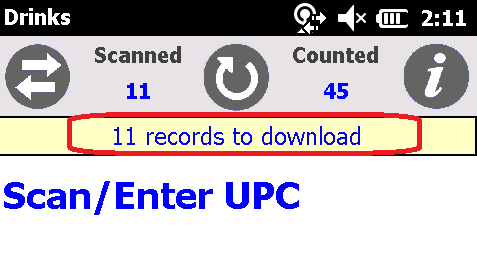
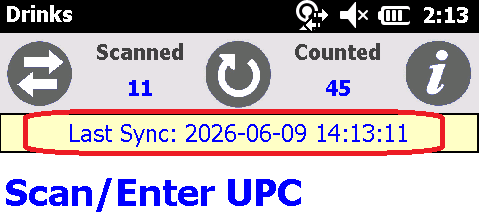
This happens when the scanner loses connection with the Hotspot, and some records remain on the scanner. To ensure all records are downloaded before exporting to D365, check there are no recorders remaining on the scanner, and the scan time of the last item counted on the count sheet.
1. On Scanner: Yellow bar - time stamp
Incorrect - not all scans are down loaded
Correct - all scans down loaded
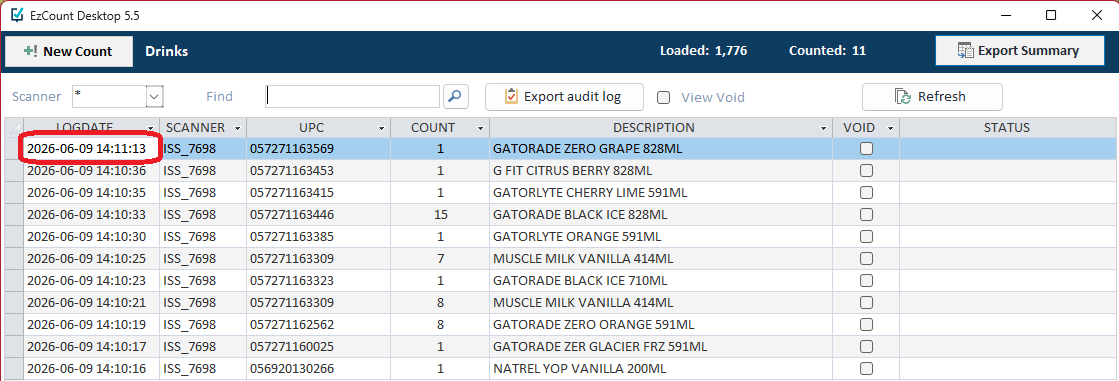
2. On Desktop: Check the scan time of last record
Check the last scan time to confirm that was you last scan.
Enjoying the discussion? Don't just read, join in!
Create an account today to enjoy exclusive features and engage with our awesome community!
Sign up